top of page

Prototyping SOLISTIC was quite the challenge as I was exposed to new design tools which I have not used before. Invision is an online software that allows designers create and prototype applications, but for me; I had begun using Sketch and so I inserted my wireframes and then prototyped. The transition needed to be adjusted to but overall the practicality became really easy.
Flow A, screen 5 which showcases the profile page directly after logging in.
Each of the highlighted blue areas are the prototype locations that will trigger the movement of the screen to another screen or will pop-up a text field in which the user can use to type in words.

Search Bar: tapping this location once will pop-up a text field, which will allow users to type in words.
Settings Icon: tapping this icon will drop down a menu option to the profile settings.
Features:
Flow E. which is specifically framed to showcase the basic operations of sharing a song, playlist, or artists to your social media outlets.
MUSIC APPLICATION
MUSIC APPLICATION

Special Features:
Flow K, is where users can go explore the international music scene and find music they like. This new idea gives audiences the chance to find specific music from regions, countries, and languages they want to hear.
Or simply discover the world through music.

Flow D, screen 4 showcases the function of adding a song to a playlist.
This screens appears directly after a song has been added to the playlist and a snack bar would appear at the bottom to confirm the action. However there is an "undo" option in the snack bar incase the user decides to go back.

Snack bar will appear after each action at the bottom of the screen.
Undo takes the user back to their previous action.
Playlist box is a collection of songs made by the user.

SOLISTIC is a music based application initially designed for an Iphone interface. This music app allows users to access millions of songs from around the world! Most music apps only searches music within regions or specific countries, but not SOLISTIC. Music as far away as rural India and pop songs from Korea is now accessible to anyone and everyone.
Prototyping SOLISTIC was quite the challenge as I was exposed to new design tools which I have not used before. Invision is an online software that allows designers create and prototype applications, but for me; I had begun using Sketch and so I inserted my wireframes and then prototyped. The transition needed to be adjusted to but overall the practicality became really easy.
Flow A, screen 5 which showcases the profile page directly after logging in.
Each of the highlighted blue areas are the prototype locations that will trigger the movement of the screen to another screen or will pop-up a text field in which the user can use to type in words.
Search Bar: tapping this location once will pop-up a text field, which will allow users to type in words.
Settings Icon: tapping this icon will drop down a menu option to the profile settings.
Flow D, screen 4 showcases the function of adding a song to a playlist.
This screens appears directly after a song has been added to the playlist and a snack bar would appear at the bottom to confirm the action. However there is an "undo" option in the snack bar incase the user decides to go back.
Snack bar will appear after each action at the bottom of the screen.
Undo takes the user back to their previous action.
Playlist box is a collection of songs made by the user.
Flow K, screen 2 showcases the function of exploring SOLISTIC's unique feature. This feature allows users to spin the globe and/or select music from different parts of the world. Discover new music styles and languages.
This screen appears after users select the search option into "new music".
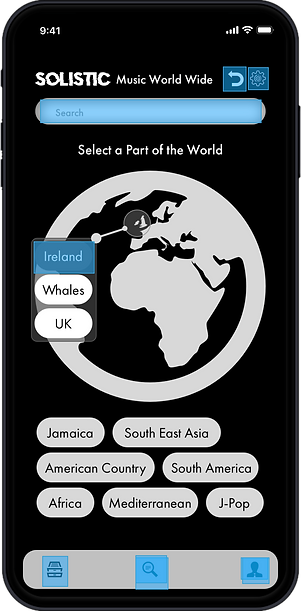
These texts buttons will allow users to access music from certain parts of the world.
The Profile button will return users back to home screen.
bottom of page